


 Zastosowany


Galactic Skies
Save $201 $ 19 .00

Sięgnij po szczegóły wykraczające poza to, co mogą zobaczyć Twoje oczy, dzięki kolekcji 14 unikalnych szablonów, które przedstawiają wspaniałe odległe galaktyki, ozdobione cudownymi gwiazdami i wszystkimi odcieniami niebieskiego, fioletu i czerni.
Zawartość zestawu
14 Templates. Compatible with JPEG and RAW images.

Korzystając z plików RAW z łatwością przećwiczysz wskazówki dotyczące retuszu i dowiesz się, jak stworzyć zdjęcia takie jak te.

 >
>

 >
>

 >
>

 >
>

 >
>

 >
>

 >
>
 >
>

 >
>
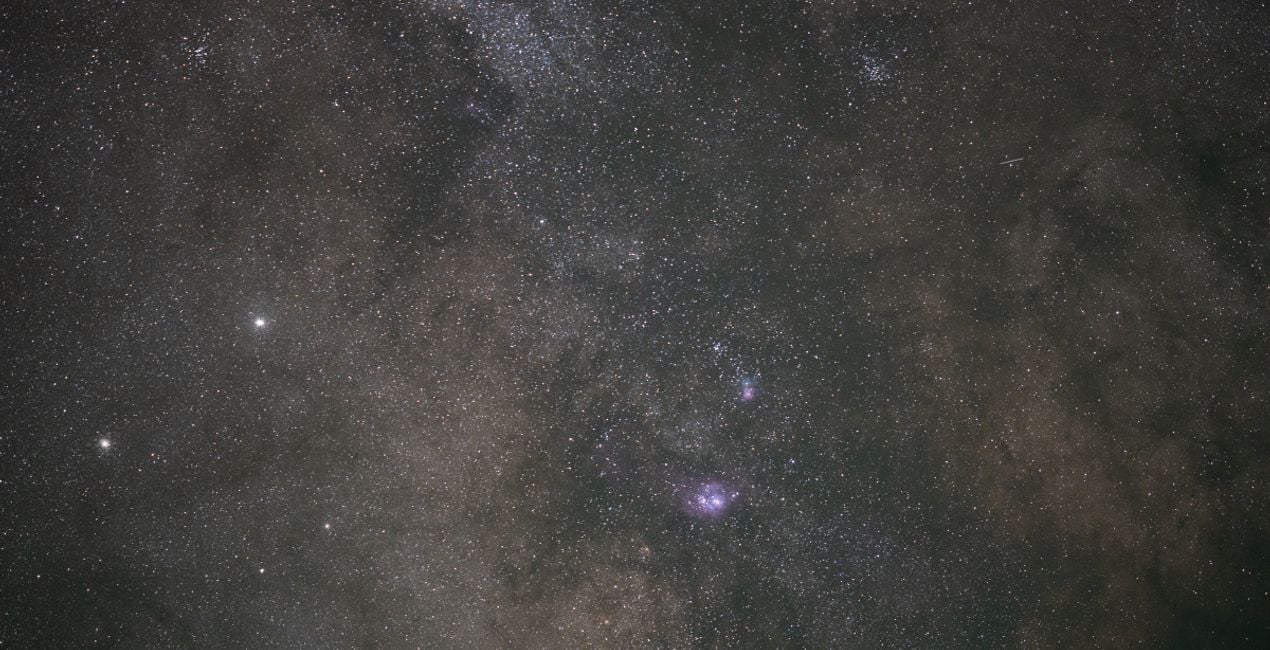
The night sky holds incredible detail in faint and distant light. While our long exposures capture far more detail than our eyes can see, it’s up to our post-processing to bring that detail to life.
These 14 Templates tackle anything from the galactic core of the Milky Way under the darkest of skies to towering mountains lit up by moonlight.
By taking advantage of traditional astrophotography processing techniques combined with tools exclusive to LuminarAI, such as EnhanceAI, Supercontrast, Mystical, and Glow, these Templates help you illustrate the wonders of the night sky.
Each Template takes a unique approach to pulling out details and enhancing your final result.
Whether you’re looking for a one-click solution or to give yourself an advantage as you further customize your image, these Templates are sure to help you unlock the details of our universe.
Jack likes to tailor these Templates by adjusting the White Balance and Exposure as a way to define the style for each image.
Astrophotographer & Timelapser
Jack Fusco is a landscape astrophotographer and timelapser based out of San Diego, California. For Jack, photography began as a way to document his travels as a touring musician, but it has become his main form of creative expression.
On his often-sleepless journeys, Jack strives to share the wonder of the night sky with as many people as possible. Whether chasing the Milky Way along coastlines or capturing the northern lights in unforgiving remote locations, he’s sure to have coffee in hand and be smiling up at the stars.
Many of Jack’s images are planned days, weeks, or even months in advance while waiting for weather and celestial objects to align. The resulting work shows a true and complete dedication to his craft.
Jack’s work has been featured by National Geographic, TEDx, the LA Times, NASA APOD, the BBC, Forbes, and many more publications.
Jeśli masz jakiekolwiek pytania dotyczące produktu, możesz skontaktować się z zespołem pomocy technicznej dostępnym 24 godziny na dobę, 7 dni w tygodniu. Wystarczy kliknąć ten link.
Aby kupić Galactic Skies, wykonaj następujące kroki:
1. Otwórz Marketplace Skylum.
2. Przejdź do odpowiedniej zakładki, w której znajduje się Galactic Skies. Kliknij na nim i dodaj produkt do koszyka.
3. Przejdź do koszyka. Tutaj zakończ proces zakupu produktu Galactic Skies.
4. Po dokonaniu zakupu otrzymasz wiadomość e-mail z linkiem do pobrania Galactic Skies. Nowy produkt znajdziesz również na swoim koncie Skylum, w zakładce Moje dodatki.
Szczegółowe instrukcje dotyczące instalacji Galactic Skies zostaną przesłane w wiadomości e-mail wraz z linkiem do pobrania
Ponadto zakupiony produkt można zainstalować bezpośrednio w programie Luminar Neo: przejdź do menu Dodatki > Marketplace, wybierz kategorię produktu, znajdź zakupiony produkt i kliknij Zainstaluj.
To całkiem proste! Przejdź do zakładki Presety, a następnie wybierz opcję Zakupione. Zainstalowane presety będą się znajdować w tym miejscu.
Nie martw się. Wszystkie zakupione produkty, w tym Galactic Skies, są przechowywane w zakładce „Moje dodatki” na koncie Skylum, co umożliwia ich łatwe ponowne pobranie i użycie.
Ogólnie rzecz biorąc, większość produktów jest kompatybilna z Luminar Neo. Aby jednak upewnić się, że Galactic Skies jest kompatybilne z Twoim oprogramowaniem, przed pobraniem lub zakupem sprawdź jego specyfikację. Poszukaj sekcji „Kompatybilność” po prawej stronie strony Galactic Skies, gdzie wymienione są wszystkie kompatybilne produkty.
Nie wychodź jeszcze. Mamy dla Ciebie ekskluzywny kod rabatowy. Wykorzystaj go w ciągu najbliższych 15 minut, aby uzyskać dodatkowe 10% zniżki przy finalizacji zamówienia. Skopiuj poniższy kod i sfinalizuj zakup.
15 m : 00 s





