


 Aplicado


Ultimate Timber Backdrops
Save $201 $ 27 .30 $ 39 .00

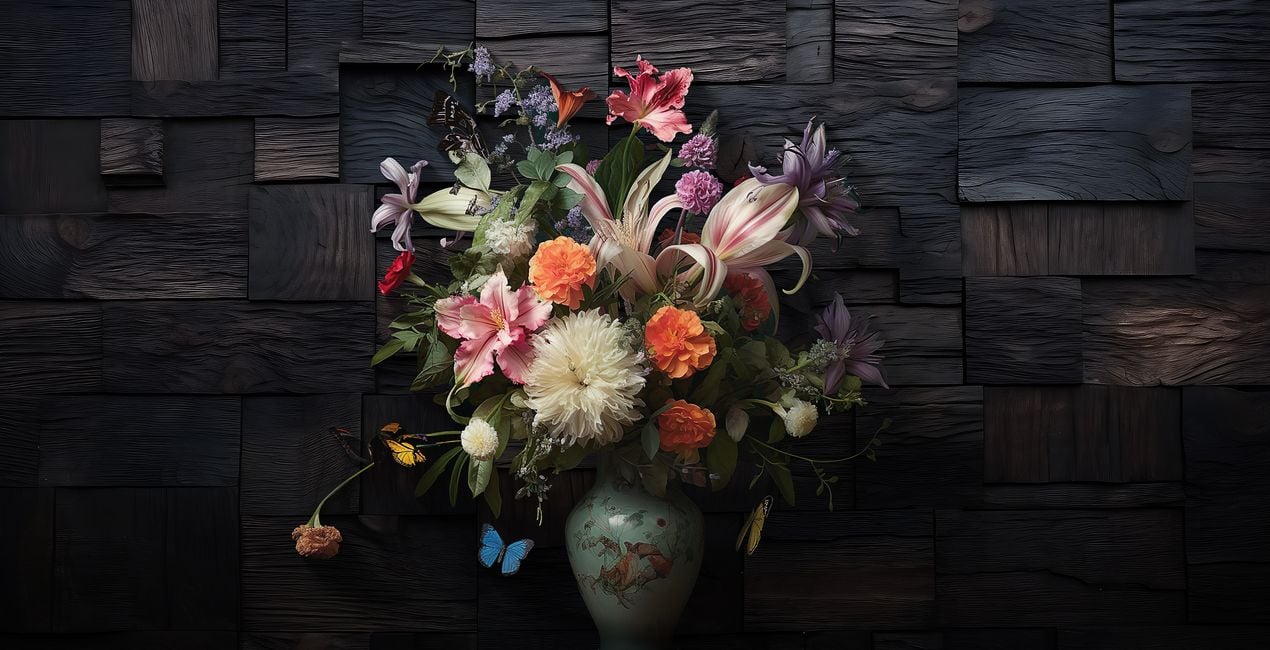
Discover the Ultimate Timber Backdrops Overlays, your one-stop solution for all your wood background needs. Elevate your photography and digital art with this meticulously curated collection of 77 premium wood backgrounds Overlays. Each backdrop is crafted in TIFF format, with an average of 10,000 pixels on the longer edge and a resolution of 300 DPI, ensuring that your images are always crisp and clear.
Qué incluye
77 Backgrounds in JPEG + TIFF format


Con los archivos RAW proporcionados, practicarás fácilmente los consejos de retoque y aprenderás a conseguir fotos como estas.

 >
>

 >
>

 >
>

 >
>

 >
>

 >
>
The pack boasts an unparalleled diversity of light and dark woods, various textures, and unique colors, making it perfect for any project. Whether you're capturing product shots, portraits, still life, or fashion, or aiming for artistic effects or seasonal vibes, these backdrops offer unmatched versatility.
Customize your art effortlessly by scaling, rotating, or flipping these backdrops to fit your vision. From autumn to the upcoming winter and festive seasons, these backgrounds are essential for setting the perfect mood.
Don't miss the chance to enrich your creative projects with the depth and authenticity only the Ultimate Timber Backdrops can offer.


Digital Artist, Architect of Visual Dreams, Skylum Ambassador
Born in Switzerland, Kathrin Federer has established an impressive art career from her base near Zurich. Initially, an abstract painter, her 2017 encounter with Photoshop revolutionized her creative process. Kathrin's ability to realize her visions sets her apart in the art world, and she has become a living source of inspiration to many.
Skillfully employing a diverse range of professional design software and various digital enhancement tools, Kathrin constructs breathtaking artworks. Her creative toolbox extends beyond Photoshop and Illustrator, embracing the full spectrum of digital technologies to bring her vibrant artistic concepts to life. These involve a fusion of her photographs, 3D objects, vectors, and her original digital elements, infusing her vibrant artistic concepts with life. Characterized by continuous growth and refinement, her art maintains a signature crisp style that is distinctively hers, transforming any setting with its profound visual impact.
Kathrin Federer draws her inspiration from a variety of sources. Everyday subjects, images, and her own vivid imagination often serve as the basis for her art. She has the unique ability to create an entire environment around a single inspirational object. This can be anything from grazing sheep in a pasture to a snapshot or a child's drawing. Kathrin's works reflect a part of her soul and are meant to take the viewer on a journey, make them think, or even just make them smile. She hopes to exude calm and serenity with her minimalist creations and offer a respite from the fast-paced modern world.
Kathrin Federer's style is a blend of minimalism and nature, with an occasional dash of humor, resulting in haunting, dreamlike scenarios. Her digital art is characterized by its clear depiction and unique compositions. Kathrin's meticulous attention to detail and perfectionism are evident in each of her works. She often incorporates elements such as animals, trees, mountains, and architectural features into her works. Kathrin's color choices and arrangement of elements in her works are carefully considered, often guided by intuition, and supported by a deep understanding of color theory and design principles.
Si tienes alguna duda o pregunta sobre el producto, puedes contactar al servicio de soporte 24/7. Visita este enlace.
Para comprar Ultimate Timber Backdrops, sigue estos pasos:
1. Abre el Marketplace de Skylum.
2. Ve a la pestaña correspondiente donde aparece Ultimate Timber Backdrops. Haz clic sobre él y añádelo a tu carrito.
3. Ve al carrito. Aquí, completa el proceso de compra de Ultimate Timber Backdrops.
4. Después de completar la compra, recibirás un correo de confirmación con el enlace de descarga de Ultimate Timber Backdrops. También encontrarás el nuevo producto en tu cuenta de Skylum, dentro de la pestaña “Mis complementos”.
Recibirás un email con instrucciones detalladas sobre cómo instalar Ultimate Timber Backdrops junto con un enlace de descarga.
También puedes instalar el producto comprado directamente desde Luminar Neo: ve a Extras > Marketplace, selecciona la categoría del producto, busca el elemento adquirido y haz clic en Instalar.
¡Es muy fácil! Primero, descarga el paquete desde tu Cuenta > Mis complementos. A continuación, sigue las instrucciones de instalación que se incluyen en la carpeta descargada. Cada tipo de recurso puede tener sus propios pasos de instalación, así que asegúrate de consultar la guía incluida.
No te preocupes. Todos los productos que hayas adquirido, como Ultimate Timber Backdrops, se almacenarán en la pestaña 'Mis complementos' de tu cuenta de Skylum para que puedas volver a descargarlos fácilmente.
Generalmente, la mayoría de productos son compatibles con Luminar Neo. Pero si quieres asegurarte de que Ultimate Timber Backdrops funciona(n) correctamente con tu software, consulta sus especificaciones antes de hacer ninguna compra o descarga. Busca la sección "Compatibilidad" en la parte derecha de la página de Ultimate Timber Backdrops, donde aparecen todos los programas compatibles.
No te vayas todavía. Aquí tienes un código de descuento exclusivo. Úsalo en los próximos 15 minutos para obtener un 10 % de descuento adicional al finalizar la compra. Copia el código que aparece a continuación y completa tu compra.
15 m : 00 s





