California Blue (3)
Mi carrito

Tu carrito está vacío

¡Descubre nuestra colección y encuentra las ediciones perfectas para tus fotos!

Mi cesta artículo artículos

Tu código especial de Fiestas:

asdfjvbknl

California Blue Aplicado

California Blue (5)
Mi carrito

Tu carrito está vacío

¡Descubre nuestra colección y encuentra las ediciones perfectas para tus fotos!

Cesta

Tu código especial de Fiestas:

asdfjvbknl

California Blue Aplicado

Precio total: $

Resumen del carrito

Pago seguro cifrado

California Blue (7)

Others Also Bought

Ahorras
by
Parte de
Ahorra 5 € al comprar el pack completo
Consigue el pack completo

Acerca de

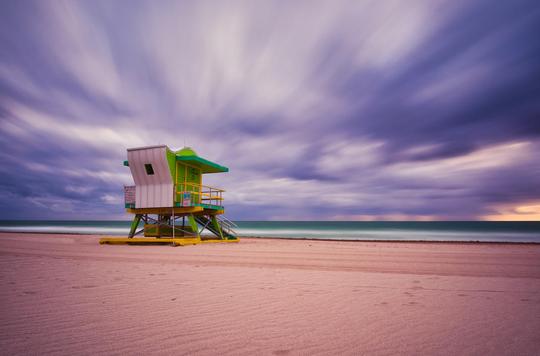
Instantly make your photos match the style of the best Instagram feeds of Los Angeles-based bloggers. With the new California Blue, regular shots become deep, emotional, thrilling, and more vibrant. This pack was created to cool down your photos with a calming blue tone. It works especially well with landscapes and portraits shot outside in natural light. The California Blue pack includes 10 Presets that you can download and use in Luminar 4, Luminar AI and 10 Presets that you can download and use in Lightroom Classic & Lightroom.

Qué incluye

10 Presets for Luminar 4, Luminar AI and Lightroom Classic & Lightroom

Compatibilidad

Luminar 4, Luminar AI, Luminar NEO, Lightroom

Consigue fotos como estas

Con los archivos RAW proporcionados, practicarás fácilmente los consejos de retoque y aprenderás a conseguir fotos como estas.


©
California Blue (39)
California Blue (40)>
Antes Después
©
California Blue (41)
California Blue (42)>
Antes Después
©
California Blue (43)
California Blue (44)>
Antes Después
©
California Blue (45)
California Blue (46)>
Antes Después

Productos relacionados

Creador

Team Skylum

Fotógrafos, coloristas y retocadores

El equipo de Skylum trabaja con cientos de fotógrafos y retocadores profesionales para traerles las plantillas que los mejores fotógrafos usan para crear sus obras maestras. El Laboratorio de Inteligencia Artificial de Skylum analiza las fotos y los flujos de trabajo de los fotógrafos y crea Plantillas que son accesibles para todos y que aprovechan la tecnología avanzada bajo el capó de LuminarAI. Nuestra misión es reducir el tiempo y el esfuerzo que se necesita para hacer una foto impactante y permitir que todos disfruten de la edición de fotos y la fotografía

FAQ

Do you have additional questions or just need advice?

contact support team

How do I contact support?

If you have any questions about the product, you can contact the 24/7 support team. Just follow this link.

How do I purchase my California Blue ?

To purchase California Blue , follow these steps:

1. Open Skylum’s Marketplace.

2. Go to the preferable tab where California Blue is listed. Click on it and add it to your cart.

3. Proceed to your cart. Here, complete the purchase process for California Blue .

4. After the purchase, you will receive a fulfillment email with the download link for California Blue . Also, you can find the new item in your Skylum account, My Add-ons tab.

How do I install my California Blue ?

Detailed instructions on installing the California Blue will be sent to you in the fulfillment email alongside the download link.

Besides, you can install the purchased item directly in Luminar Neo: go to Extras > Marketplace, Select the Product category, find the purchased item, and click Install.

Where do I find my California Blue after installation?

It’s pretty easy! First, download the pack from your Account > My Add-ons. Then follow the installation instructions inside the downloaded folder. Each asset type may have its own installation steps, so make sure to check the guide included.

What if I lose my California Blue ?

Don't worry. All purchased items, including California Blue , are stored in the 'My Add-ons' tab of your Skylum account, allowing for easy redownload and use.

How do I check whether the California Blue is compatible with my software?

Generally, most items are compatible with Luminar Neo. But to ensure California Blue is compatible with your software, review its specifications before downloading or purchasing. Look for the 'Compatibility' section at the right of the California Blue page, where all compatible products are listed.

Crea más. Gasta menos. Oferta de Black Friday: 25% de descuento en todos los assets con el código
BF25

00d

:

00h

:

00m

:

00s

California Blue (49)